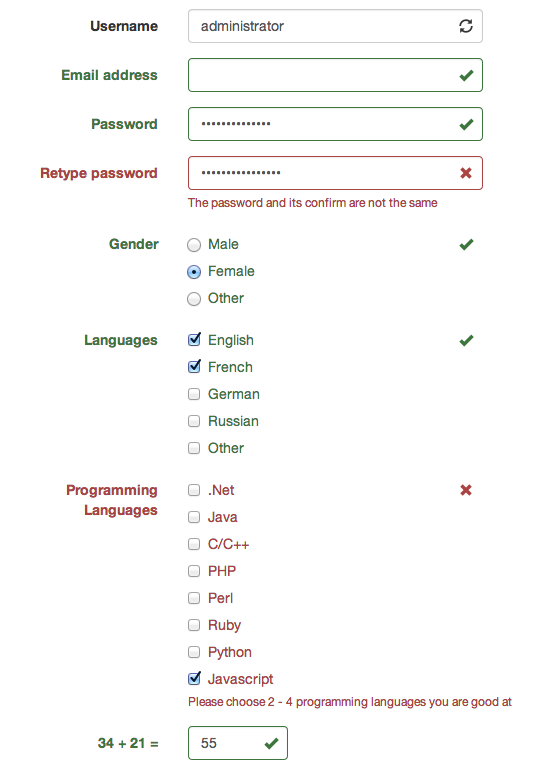
# BootstrapValidator A jQuery plugin to validate form fields. Use with [Bootstrap 3](http://getbootstrap.com) ![Screenshot](screenshots/screenshot.png) ## Features * Built from scratch. The code is solid and clean * 17 built-in [validators](#validators) * Cannot find the validator you need? Don't worry, it is easy to [write new validator](#write-new-validator) * Show feedback icons based on field validity * Support Ajax in both validator and form submission ## Required * [jQuery](http://jquery.com/) * [Bootstrap 3](http://getbootstrap.com/) ## Demo You can see the live demo here: * [Sample demo](https://rawgithub.com/nghuuphuoc/bootstrapvalidator/master/demo/index.html) * [Validator examples](https://rawgithub.com/nghuuphuoc/bootstrapvalidator/master/demo/validators.html) * [Custom submit handler](https://rawgithub.com/nghuuphuoc/bootstrapvalidator/master/demo/submitHandler.html) ## Install You can download the [latest version](https://github.com/nghuuphuoc/bootstrapvalidator/releases) or use [bower](http://bower.io) to install BootstrapValidator: ```bash $ bower install bootstrapValidator ``` ## Usage The plugin has two versions: * The source one placed in ```src/js``` directory which is not compressed and doesn't include any validators. It is used in case you want to debug or develop new validator. * The compressed one placed in ```dist/js``` directory which includes all validators. It should be used in the production site. Since the __BootstrapValidator__ plugin requires jQuery and Bootstrap 3, you have to include the required CSS and JS files to your page: ```html // Either use the compressed version (recommended in the production site) // Or use the original one with all validators included // Or use the plugin with required validators ``` Call the plugin to validate the form as following: ```javascript $(document).ready(function() { $(
).bootstrapValidator({ message: 'This value is not valid', columns: 12, feedbackIcons: null, submitButtons: 'button[type="submit"]', submitHandler: null, live: 'enabled', fields: ... }); }); ``` ```message```: The default error message for all fields. You can specify the error message for any fields ```columns```: The number of grid columns. Change it if you use custom grid with different number of columns ```feedbackIcons```: Show valid/invalid/validating icons based on the field validity. This feature requires [Bootstrap v3.1.0 or later](http://getbootstrap.com/css/#forms-control-validation). Since Bootstrap doesn't provide any methods to know its version, this option cannot be on/off automatically. In other word, to use this feature you have to upgrade your Bootstrap to v3.1.0 or later. It supports [Glyphicons](http://getbootstrap.com/components/#glyphicons) (included in Bootstrap): ```javascript feedbackIcons: { valid: 'glyphicon glyphicon-ok', invalid: 'glyphicon glyphicon-remove', validating: 'glyphicon glyphicon-refresh' } ``` and [FontAwesome](http://fontawesome.io/icons) icons (don't forget to insert FontAwesome CSS in your ```head```): ```javascript feedbackIcons: { valid: 'fa fa-check', invalid: 'fa fa-times', validating: 'fa fa-refresh' } ``` ```submitButtons```: The submit buttons selector. These buttons will be disabled when the form input are invalid ```submitHandler```: Custom submit handler. ```javascript submitHandler: function(validator, form, submitButton) { } ``` The handler has three arguments: - ```validator``` is the instance of BootstrapValidator - ```form``` is jQuery object representing the current form - ```submitButton``` is jQuery object representing the submit button which is clicked This option is useful when you want to use Ajax to submit the form data: ```javascript submitHandler: function(validator, form, submitButton) { // Use Ajax to submit form data $.post(form.attr('action'), form.serialize(), function(result) { // ... process the result ... }, 'json'); } ``` By default, ```submitHandler``` is ```null``` ```live```: Live validating. Can be one of 3 values: - ```enabled```: The plugin validates fields as soon as they are changed - ```disabled```: Disable the live validating. The error messages are only shown after the form is submitted - ```submitted```: The live validating is enabled after the form is submitted ```fields```: The fields which need to be validated ```javascript fields: { ... // The field name // It is value of the name attribute : { // The default error message for this field message: ..., // Array of validators validators: { ... : ... } } ... } ``` The `````` can be the name of the built-in validator which are described in the [Validators](#validators) section ## Validators Below is the list of built-in validators sorted in alphabetical order: Validator name | Description ----------------------------------------|------------ [between](#between-validator) | Check if the input value is between (strictly or not) two given numbers [callback](#callback-validator) | Return the validity from a callback method [choice](#choice-validator) | Check if the number of checked boxes are less or more than a given number creditCard | Validate a credit card number [different](#different-validator) | Return true if the input value is different with given field's value digits | Return true if the value contains only digits emailAddress | Validate an email address [greaterThan](#greaterthan-validator) | Return true if the value is greater than or equals to given number hexColor | Validate a hex color [identical](#identical-validator) | Check if the value is the same as one of particular field [lessThan](#lessthan-validator) | Return true if the value is less than or equals to given number notEmpty | Check if the value is empty [regexp](#regexp-validator) | Check if the value matches given Javascript regular expression [remote](#remote-validator) | Perform remote checking via Ajax request [stringLength](#stringlength-validator) | Validate the length of a string uri | Validate an URL address [zipCode](#zipcode-validator) | Validate a zip code The validator options are described in the following section: (**The options marked with * are required**) ### between validator Option name | Default | Description ------------|---------|------------ message | n/a | The error message min (*) | n/a | The lower value in the range max (*) | n/a | The upper value in the range inclusive | true | Can be ```true``` or ```false```. If ```true```, the input value must be in the range strictly ### callback validator Option name | Default | Description -------------|---------|------------ message | n/a | The error message callback (*) | n/a | The callback method The callback method must follow the format below: ```javascript function(fieldValue, validator) { // fieldValue is the value of field // validator is instance of BootstrapValidator // Check the field validity // return true or false } ``` ### choice validator Option name | Default | Description ------------|---------|------------ message | n/a | The error message min | n/a | The minimum number of check boxes required to be checked max | n/a | The maximum number of check boxes required to be checked. At least one of ```min``` and ```max``` is required ### different validator Option name | Default | Description ------------|---------|------------ message | n/a | The error message field (*) | n/a | The name of field that will be used to compare with current one ### greaterThan validator | Option name | Default | Description |-------------|---------|------------ | message | n/a | The error message | value (*) | n/a | The number to make a comparison to | inclusive | false | Can be ```true``` or ```false``` | | | If ```true```, the input value must be greater than the comparison one | | | If ```false```, the input value must be greater than or equal to the comparison one ### identical validator Option name | Default | Description ------------|---------|------------ message | n/a | The error message field (*) | n/a | The name of field that will be used to compare with current one ### lessThan validator | Option name | Default | Description | ------------|---------|------------ | message | n/a | The error message | value (*) | n/a | The number to make a comparison to | inclusive | false | Can be ```true``` or ```false``` | | | If ```true```, the input value must be less than the comparison one | | | If ```false```, the input value must be less than or equal to the comparison one ### regexp validator Option name | Default | Description ------------|---------|------------ message | n/a | The error message regexp (*) | n/a | The Javascript regular expression ### remote validator Option name | Default | Description ------------|--------------------------------|------------ message | n/a | The error message url (*) | n/a | The remote URL that responses an encoded JSON of array containing the ```valid``` key data | ```{ fieldName: fieldValue}``` | The data sent to remote URL It also supports dynamic data which is returned by a function: ```javascript remote: { url: 'remote.php', data: function(validator) { // validator is the plugin instance // Returns an object which is used to send to remote URL // For example, the sample code below posts the username to remote URL: // return { // username: validator.getFieldElements('username').val() // }; } } ``` ### stringLength validator Option name | Default | Description ------------|---------|------------ message | n/a | The error message min | n/a | The minimum length max | n/a | The maximum length. One of ```min```, ```max``` options is required ### zipCode validator | Option name | Default | Description | ------------|---------|------------ | message | n/a | The error message | country | US | A ISO 3166 country code. Currently it supports the following countries: US (United State), DK (Denmark), SE (Sweden) ## API ### ```validate``` ```validate()```: Validate form manually. It is useful when you want to validate form by clicking a button or a link instead of a submit buttons. ```javascript $(form).bootstrapValidator(options).bootstrapValidator('validate'); // or var validator = $(form).bootstrapValidator(options); validator.validate(); ``` ### ```isValid``` ```isValid()```: Returns ```true``` if all form fields are valid. Otherwise, returns ```false```. Ensure that the ```validate``` method is already called after calling this one. ### ```resetForm``` ```resetForm(resetFormData)```: Reset form. It hides all error elements and feedback icons. All the fields are marked as not validated yet. If ```resetFormData``` is ```true```, the method resets the form fields. ```javascript var validator = $(form).bootstrapValidator(options); validator.resetForm(); ``` ## Write new validator > If you develop new validator which might be useful to other, please [fork](https://github.com/nghuuphuoc/bootstrapvalidator/fork) and pull a new request. > Then I will add it as a built-in validator A validator has to follow the syntax: ```javascript (function($) { $.fn.bootstrapValidator.validators. = { /** * @param {BootstrapValidator} validator The validator plugin instance * @param {jQuery} $field The jQuery object represents the field element * @param {Object} options The validator options * @returns {boolean} */ validate: function(validator, $field, options) { // You can get the field value // var value = $field.val(); // // Perform validating // ... // // return true if the field value is valid // otherwise return false } }; }(window.jQuery)); ``` `````` is the validator name. Since the validators are distinct by the names, `````` has to be different with [built-in validators](#validators). To apply the validator to particular field: ```javascript $(form).bootstrapValidator({ fields: { : { // Replace with the name of validator // will be passed as third parameter of the // validate(validator, $field, options) method : } } }); ``` For Rails, the input field is constructed from model name and field name. For example, user have email as field, when form helper render view, the input field name will be ```'user[email]'```. The syntax for these is somewhat different as shown below: ```javascript $(form).bootstrapValidator({ fields: { 'user[email]': { // Replace with the name of validator // will be passed as third parameter of the // validate(validator, $field, options) method : } } }); ``` To see how built-in validators are developed, you can look at their sources located at the [```src/js/validator```](src/js/validator) directory. ## Build BootstrapValidator uses [grunt](http://gruntjs.com) to simplify building process. From the BootstrapValidator root directory, install dependencies: ```bash $ npm install ``` Then, uses grunt to build: ```bash $ grunt ``` If you want grunt to generate scripts whenever the original scripts (located in ```src```) change, use the following command: ```bash $ grunt watch ``` The generated scripts (including source and compressed versions) are placed inside the ```dist``` directory. ## Release History Look at the [Change Log](CHANGELOG.md) ## Author The __BootstrapValidator__ plugin is written by Nguyen Huu Phuoc, aka @nghuuphuoc * [http://twitter.com/nghuuphuoc](http://twitter.com/nghuuphuoc) * [http://github.com/nghuuphuoc](http://github.com/nghuuphuoc) Big thanks to the contributors: * [@emilchristensen](https://github.com/emilchristensen) * [@khangvm53](https://github.com/khangvm53) * [@kristian-puccio](https://github.com/kristian-puccio) * [@ikanedo](https://github.com/ikanedo) * [@iplus](https://github.com/iplus) * [@narutosanjiv](https://github.com/narutosanjiv) * [@vaz](https://github.com/vaz) * ... might be you! Let's [fork](https://github.com/nghuuphuoc/bootstrapvalidator/fork) and pull a request! ## License ``` The MIT License (MIT) Copyright (c) 2013 - 2014 Nguyen Huu Phuoc Permission is hereby granted, free of charge, to any person obtaining a copy of this software and associated documentation files (the "Software"), to deal in the Software without restriction, including without limitation the rights to use, copy, modify, merge, publish, distribute, sublicense, and/or sell copies of the Software, and to permit persons to whom the Software is furnished to do so, subject to the following conditions: The above copyright notice and this permission notice shall be included in all copies or substantial portions of the Software. THE SOFTWARE IS PROVIDED "AS IS", WITHOUT WARRANTY OF ANY KIND, EXPRESS OR IMPLIED, INCLUDING BUT NOT LIMITED TO THE WARRANTIES OF MERCHANTABILITY, FITNESS FOR A PARTICULAR PURPOSE AND NONINFRINGEMENT. IN NO EVENT SHALL THE AUTHORS OR COPYRIGHT HOLDERS BE LIABLE FOR ANY CLAIM, DAMAGES OR OTHER LIABILITY, WHETHER IN AN ACTION OF CONTRACT, TORT OR OTHERWISE, ARISING FROM, OUT OF OR IN CONNECTION WITH THE SOFTWARE OR THE USE OR OTHER DEALINGS IN THE SOFTWARE. ```